> ## Documentation Index
> Fetch the complete documentation index at: https://knowledge.bitbybit.studio/llms.txt
> Use this file to discover all available pages before exploring further.
# How to Add a Product Collection
> Add a product Collections element in bitApp, pick a collection, and set how many products display on your homepage
Easily add a new product collection to showcase your offerings with visually engaging layouts. This guide walks you through the steps to set up and customize your collections to match your brand’s look.
## **Step 1: Access your** [**bitApp dashboard**](https://app.bitbybit.studio/bitapp/design)
## **Step 2: Drag and drop Collections element**
* Drag and drop the \*\*Collections \*\*in your mobile mockup then it will appear in the sidebar.
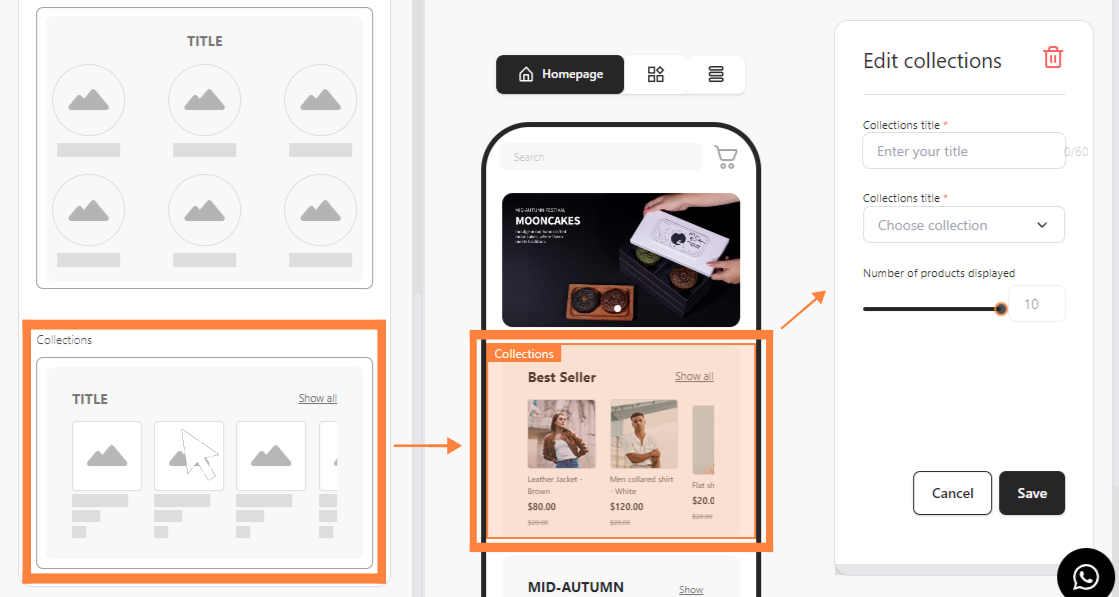 Drag and drop the “Collections” in your mobile mockup
## **Step 3: Fill in Collections details**
* Fill in **Collections Title** and choose **Collections Title** in the dropdown.
Drag and drop the “Collections” in your mobile mockup
## **Step 3: Fill in Collections details**
* Fill in **Collections Title** and choose **Collections Title** in the dropdown.
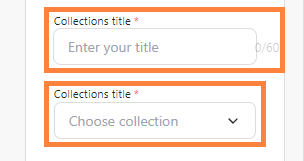 Fill in **Collections Title** and choose **Collections Title**
## **Step 4: Set the number of products**
* Set your **Number of products displayed** then click **Save**.
Fill in **Collections Title** and choose **Collections Title**
## **Step 4: Set the number of products**
* Set your **Number of products displayed** then click **Save**.
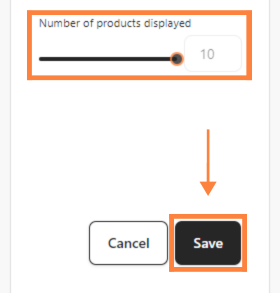 Set **Number of products displayed** and click **Save**