> ## Documentation Index
> Fetch the complete documentation index at: https://knowledge.bitbybit.studio/llms.txt
> Use this file to discover all available pages before exploring further.
# How to manage customer details in live chat
> Edit a customer's name and update their custom fields directly from the bitChat live chat info panel without leaving the conversation.
While you're chatting with a customer in bitChat live chat, you can update their details from the conversation — edit their name from the chat header, and view or edit their custom fields in the **Additional data** card.
## Prerequisites
* You can open **bitChat** live chat.
* You have a conversation open with a customer selected.
## Edit a customer's name
1. In the chat header, click the customer's name. The edit-customer modal opens.
2. Update the details and save.
 ## Update custom fields in the Additional data card
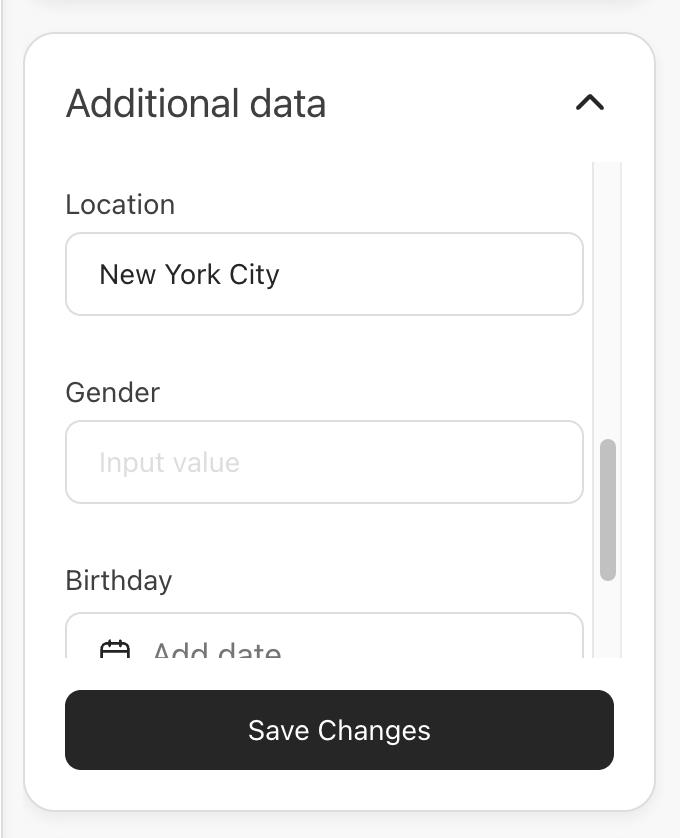
The **Additional data** card sits under the **Tags** card in the live chat info panel. It shows one inline input per custom field, so you can update a customer's metafields without leaving the conversation.
1. Open the customer's info panel and find the **Additional data** card.
2. Edit the fields inline. Each field uses the input that matches its type — text, number, options, or date.
3. Click **Save Changes**.
After the values save, the button returns to **Add or edit field**.
## Update custom fields in the Additional data card
The **Additional data** card sits under the **Tags** card in the live chat info panel. It shows one inline input per custom field, so you can update a customer's metafields without leaving the conversation.
1. Open the customer's info panel and find the **Additional data** card.
2. Edit the fields inline. Each field uses the input that matches its type — text, number, options, or date.
3. Click **Save Changes**.
After the values save, the button returns to **Add or edit field**.
 If the customer has no custom fields yet, the card shows an **Add a field** state. Use it to add the first field, then fill in its value.
## Related articles
* [Understanding the anatomy of multi-agent chat](/bitchat/understanding-the-anatomy-of-multi-agent-chat)
* [How to filter chat](/bitchat/how-to-filter-chat)
If the customer has no custom fields yet, the card shows an **Add a field** state. Use it to add the first field, then fill in its value.
## Related articles
* [Understanding the anatomy of multi-agent chat](/bitchat/understanding-the-anatomy-of-multi-agent-chat)
* [How to filter chat](/bitchat/how-to-filter-chat)