> ## Documentation Index
> Fetch the complete documentation index at: https://knowledge.bitbybit.studio/llms.txt
> Use this file to discover all available pages before exploring further.
# How to set up a pre-chat form in Chat Widget
> Ask anonymous visitors for their name, email, or phone number before they start chatting, so agents see a real name instead of a placeholder.
Use the **Pre-chat form** to ask visitors for their details before the chat opens. Agents then see the visitor's real name in Live Chat instead of a placeholder like **Customer 1234**.
The form only shows to anonymous visitors. Customers who are logged in to your store skip it.
## Prerequisites
* You can open [**bitChat > Chat Widget**](https://app.bitbybit.studio/bitchat/chat-widget).
* Your widget uses an on-site chat style. The pre-chat form isn't available for the **Redirect** style.
## Step 1: Open Pre-chat form
* Go to [**bitChat > Chat Widget**](https://app.bitbybit.studio/bitchat/chat-widget).
* Open **Widget**.
* Find **Pre-chat form**.
## Step 2: Turn on Pre-chat form
* Turn on the **Pre-chat form** switch.
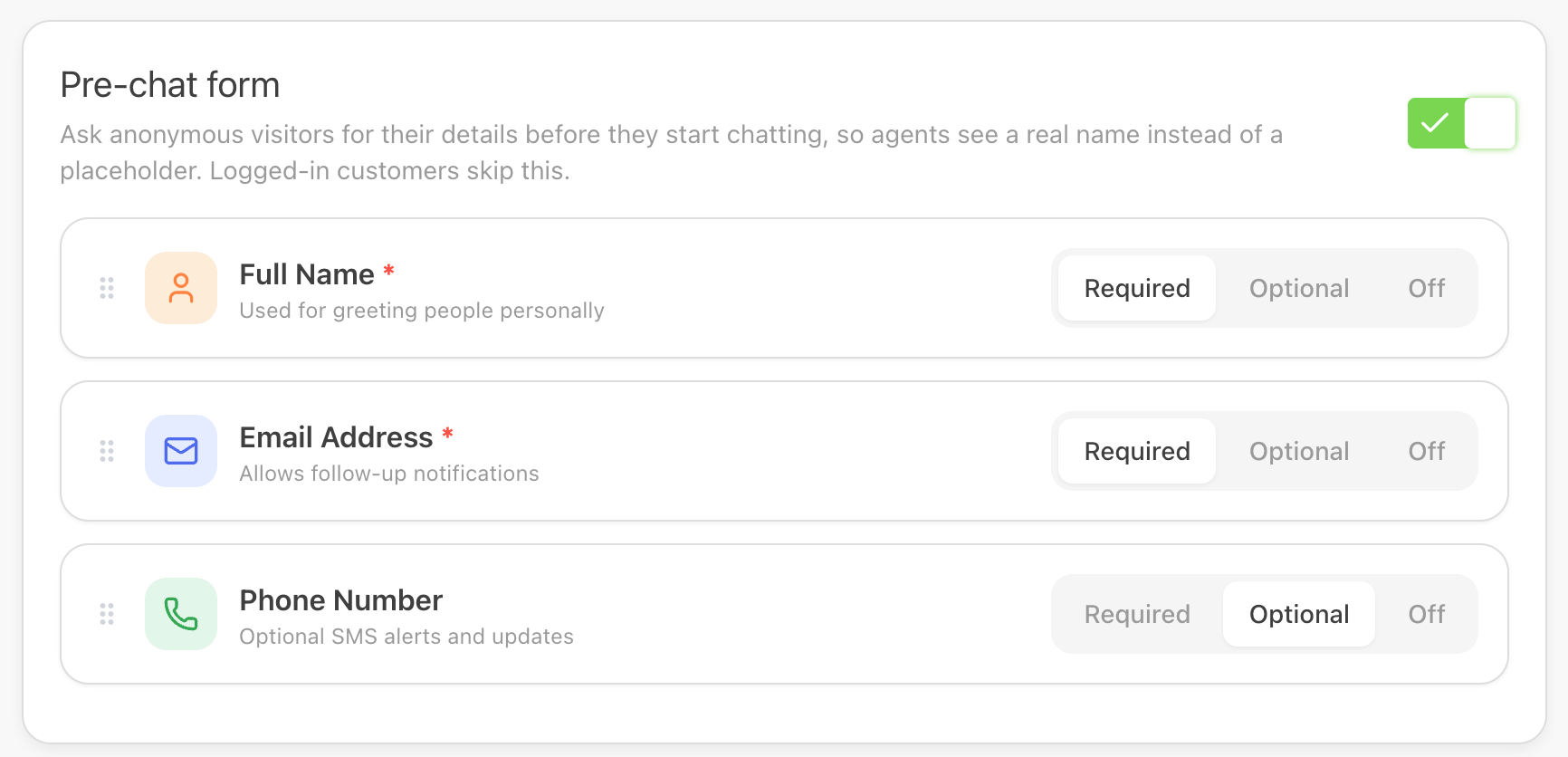
* The field list appears. By default, **Full Name** and **Email Address** are **Required**, and **Phone Number** is **Off**.
 ## Step 3: Choose which fields to ask for
For each field, choose one option:
* **Required** — visitors must fill it in to start chatting.
* **Optional** — the field shows, but visitors can leave it empty.
* **Off** — the field isn't shown.
Available fields:
* **Full Name**
* **Email Address**
* **Phone Number**
⚠️ At least one field must be **Required** or **Optional**. If all fields are **Off**, you can't save.
⚠️ If no field is **Required**, visitors can start chatting without giving any details. You'll see a warning, but you can still save.
## Step 4: Reorder the fields (optional)
* Drag a field by its handle to change the order it appears in the form.
## Step 5: Save your changes
* Check the live preview to see the form as visitors will.
* Save the widget settings.
## Step 3: Choose which fields to ask for
For each field, choose one option:
* **Required** — visitors must fill it in to start chatting.
* **Optional** — the field shows, but visitors can leave it empty.
* **Off** — the field isn't shown.
Available fields:
* **Full Name**
* **Email Address**
* **Phone Number**
⚠️ At least one field must be **Required** or **Optional**. If all fields are **Off**, you can't save.
⚠️ If no field is **Required**, visitors can start chatting without giving any details. You'll see a warning, but you can still save.
## Step 4: Reorder the fields (optional)
* Drag a field by its handle to change the order it appears in the form.
## Step 5: Save your changes
* Check the live preview to see the form as visitors will.
* Save the widget settings.
 ## What visitors see
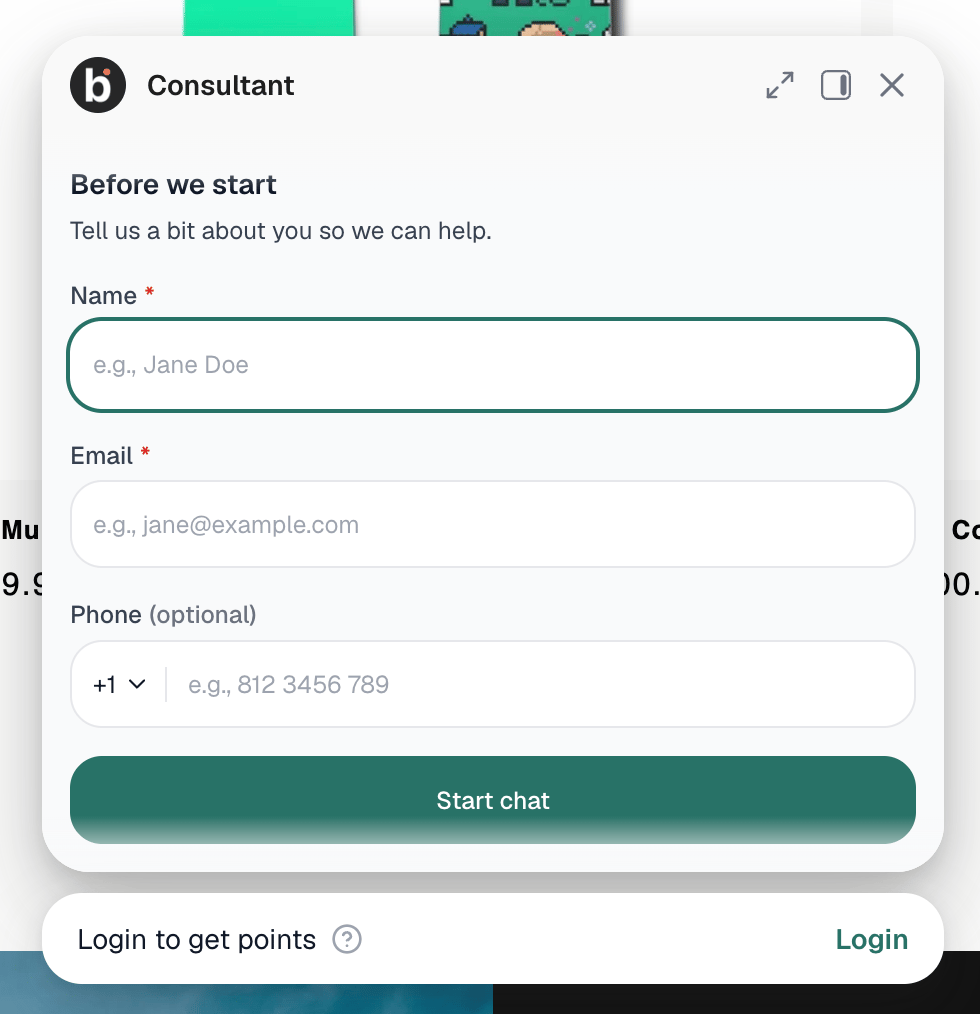
When an anonymous visitor opens the widget, they see a **Before we start** form with the fields you turned on. After they click **Start chat**, the chat opens and their details are saved to the customer profile.
Returning visitors on the same browser session aren't asked again.
## Related articles
* [How visitor information is collected](/bitchat/how-visitor-information-is-collected)
* [Chat Widget overview](/bitchat/chat-widget-overview)
* [How to set up conversation starters in Chat Widget](/bitchat/how-to-set-up-conversation-starters-in-chat-widget)
## What visitors see
When an anonymous visitor opens the widget, they see a **Before we start** form with the fields you turned on. After they click **Start chat**, the chat opens and their details are saved to the customer profile.
Returning visitors on the same browser session aren't asked again.
## Related articles
* [How visitor information is collected](/bitchat/how-visitor-information-is-collected)
* [Chat Widget overview](/bitchat/chat-widget-overview)
* [How to set up conversation starters in Chat Widget](/bitchat/how-to-set-up-conversation-starters-in-chat-widget)