> ## Documentation Index
> Fetch the complete documentation index at: https://knowledge.bitbybit.studio/llms.txt
> Use this file to discover all available pages before exploring further.
# GoSend
> Connect a Gojek Corporate account to bitbybit with your Client ID and API Key to enable automated GoSend deliveries
Connect your Gojek Corporate account to enable automated GoSend deliveries for your store.
This integration requires a B2B Gojek Enterprise account. It cannot be connected using a personal Gojek app account.
## Step 1: Locate GoSend in Integrations
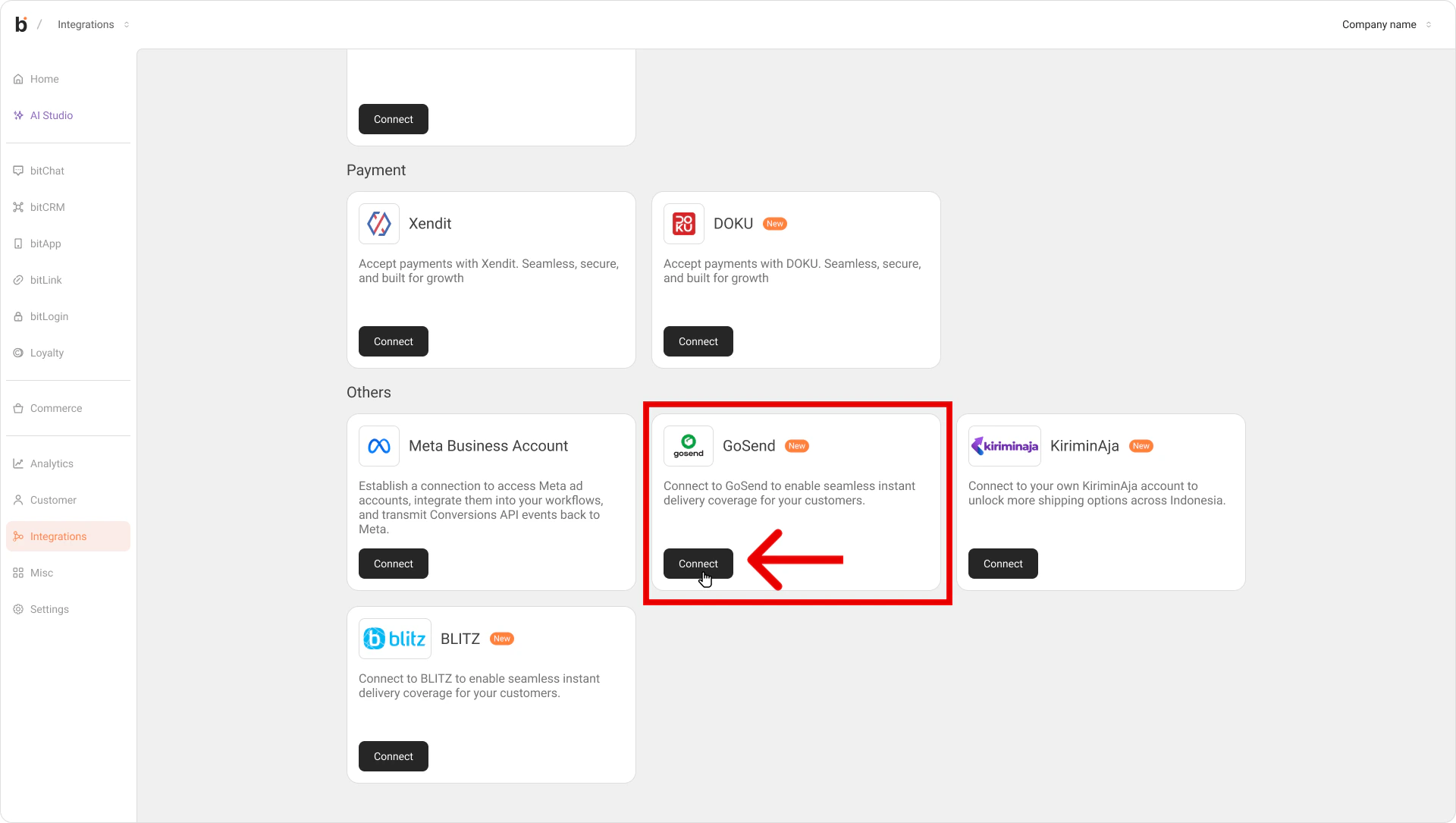
Log in to bitbybit, go to [Integrations](https://app.bitbybit.studio/integrations), find the **GoSend** card, and click **Connect** to open the setup modal.
 ## Step 2: Register for a Gojek Corporate account
If you don't already have a Gojek Enterprise account, learn more at [Gojek GoSend API](https://www.gojek.com/id-id/gosend/api). Complete Gojek's verification steps and wait for them to approve your business account.
Integration cannot proceed until Gojek issues your official B2B API keys.
## Step 3: Copy your GoSend API keys
Once Gojek approves your corporate account, copy your **Client ID** and **API Key** (or Passkey).
## Step 4: Connect GoSend on bitbybit
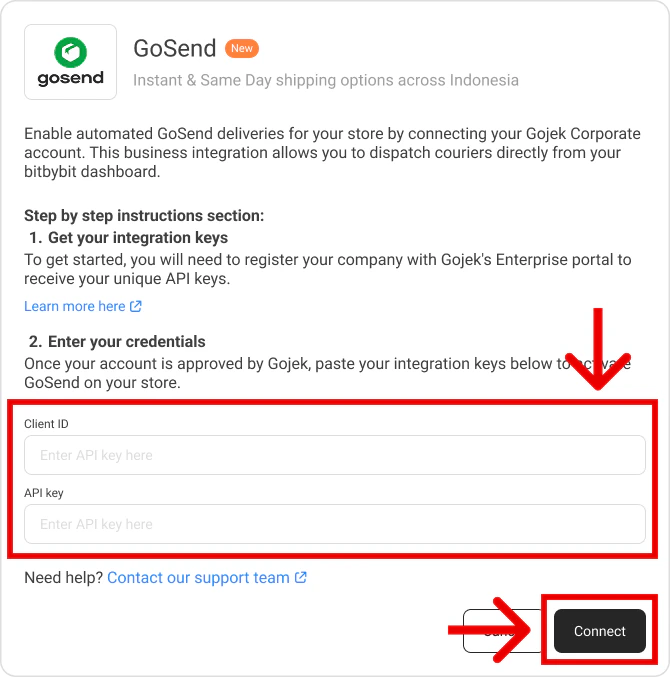
Return to the GoSend modal in your bitbybit dashboard and paste the **Client ID** and **API Key** into their fields.
## Step 2: Register for a Gojek Corporate account
If you don't already have a Gojek Enterprise account, learn more at [Gojek GoSend API](https://www.gojek.com/id-id/gosend/api). Complete Gojek's verification steps and wait for them to approve your business account.
Integration cannot proceed until Gojek issues your official B2B API keys.
## Step 3: Copy your GoSend API keys
Once Gojek approves your corporate account, copy your **Client ID** and **API Key** (or Passkey).
## Step 4: Connect GoSend on bitbybit
Return to the GoSend modal in your bitbybit dashboard and paste the **Client ID** and **API Key** into their fields.
 ## Step 5: Save and complete the connection
Click **Connect** at the bottom of the modal. Once your keys are validated, the GoSend card status changes to **Connected**.
Your GoSend corporate account is now synced. You can manage GoSend deliveries directly from bitbybit.
## Related
* [KiriminAja](/integrations/kiriminaja)
* [RideBlitz](/integrations/rideblitz)
## Step 5: Save and complete the connection
Click **Connect** at the bottom of the modal. Once your keys are validated, the GoSend card status changes to **Connected**.
Your GoSend corporate account is now synced. You can manage GoSend deliveries directly from bitbybit.
## Related
* [KiriminAja](/integrations/kiriminaja)
* [RideBlitz](/integrations/rideblitz)