> ## Documentation Index
> Fetch the complete documentation index at: https://knowledge.bitbybit.studio/llms.txt
> Use this file to discover all available pages before exploring further.
# Deduct points for refunds or cancellations
> Turn the automatic points reversal setting on or off so refunded and cancelled orders don't leave customers holding points they no longer earned.
When a customer earns points on an order and that order is later refunded or cancelled, those points are no longer earned — but they stay in the customer's balance unless something takes them back. **Deduct points for refunds or cancellations** removes them automatically, so you don't have to correct balances by hand.
The setting lives on the **Earn points** page and is **on by default**. The Earn points page is marked **Beta**.
## Before you start
* Your store is connected to bitbybit via **bitLogin**. The setting is disabled until a source is connected, the same as **Earning rate**.
* Your loyalty program is enabled. See [Loyalty quickstart](/loyalty/quickstart) if you haven't set one up yet.
## Step 1: Open the setting
* In the sidebar, open [**bitLoyalty > Earn points**](https://app.bitbybit.studio/loyalty/earn-points).
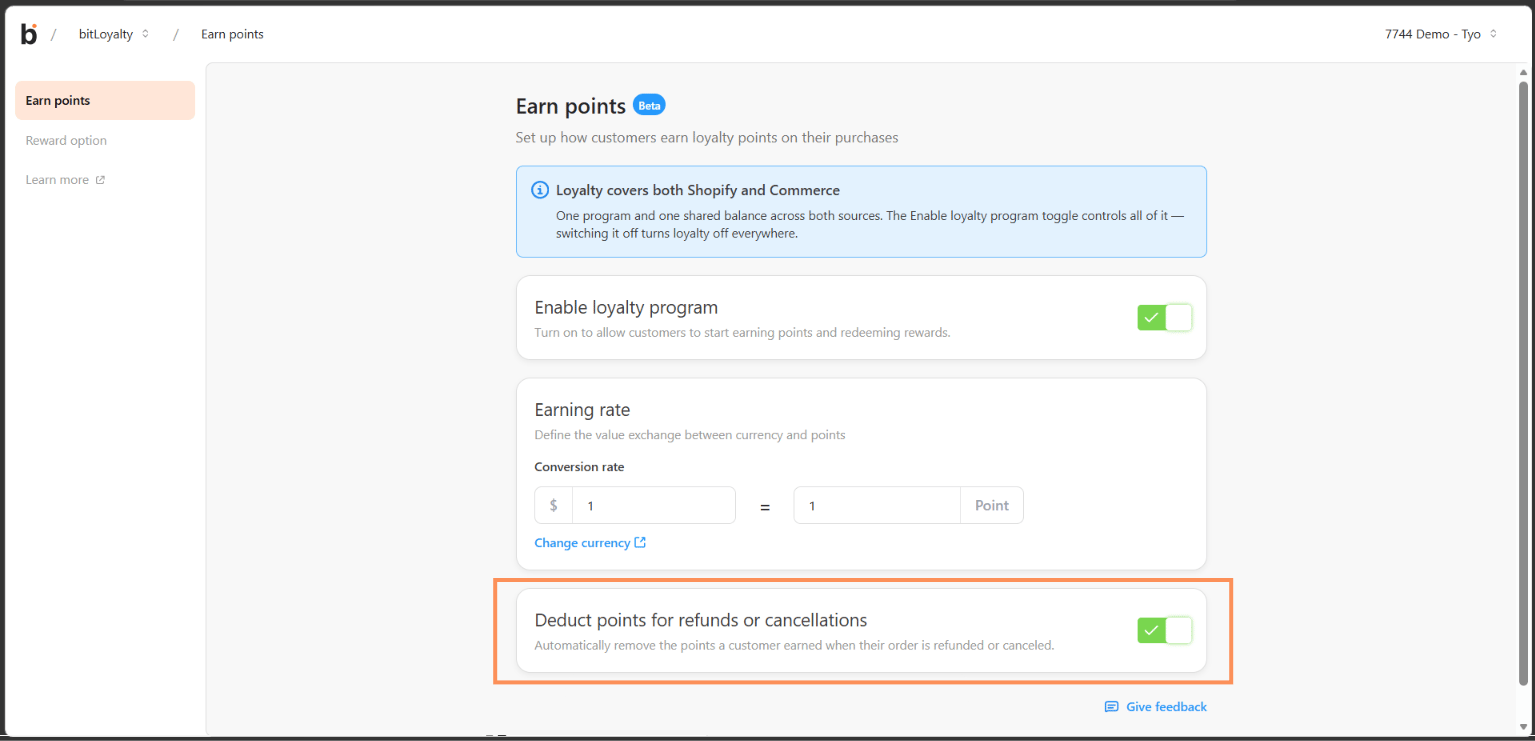
* Scroll to the **Deduct points for refunds or cancellations** card, below **Earning rate**.
 ## Step 2: Turn the setting on or off
* Use the switch on the right of the card.
* The change saves immediately. There is no **Save changes** banner and no confirmation message.
* The switch is briefly disabled while the change is saving. If it fails, the switch returns to its previous position and you'll see the toast `Failed to update loyalty program`.
Leave this on unless you deliberately want customers to keep points from refunded orders — for example, if you treat the points as a goodwill gesture.
## What gets deducted
The deduction is calculated from the refunded amount, so a partial refund reverses only the points earned on the refunded portion. This applies to both Shopify and Commerce orders, including partial refunds on Commerce.
bitLoyalty runs as one program with one shared balance across Shopify and Commerce, and this setting follows that model: it is a single switch covering every connected source. You cannot turn reversal on for one source and off for another.
If the reversal takes a customer's balance below the points they've already redeemed, their balance can end up lower than they expect. Check the customer's points history on their detail page before responding to a complaint about a missing balance.
## Notify customers when points are reversed
The setting itself doesn't send any message. If you want to tell customers that their points were adjusted, build an automation on the bitLoyalty **Points refunded** trigger — for example, sending a WhatsApp message that explains the deduction.
See [Set up bitLoyalty triggers in automation](/bitcrm/how-to-set-up-bitloyalty-triggers-in-automation).
## Related
* [Loyalty quickstart](/loyalty/quickstart)
* [Set up bitLoyalty triggers in automation](/bitcrm/how-to-set-up-bitloyalty-triggers-in-automation)
* [Set up Shopify triggers in automation](/bitcrm/how-to-set-up-shopify-triggers-in-automation)
## Step 2: Turn the setting on or off
* Use the switch on the right of the card.
* The change saves immediately. There is no **Save changes** banner and no confirmation message.
* The switch is briefly disabled while the change is saving. If it fails, the switch returns to its previous position and you'll see the toast `Failed to update loyalty program`.
Leave this on unless you deliberately want customers to keep points from refunded orders — for example, if you treat the points as a goodwill gesture.
## What gets deducted
The deduction is calculated from the refunded amount, so a partial refund reverses only the points earned on the refunded portion. This applies to both Shopify and Commerce orders, including partial refunds on Commerce.
bitLoyalty runs as one program with one shared balance across Shopify and Commerce, and this setting follows that model: it is a single switch covering every connected source. You cannot turn reversal on for one source and off for another.
If the reversal takes a customer's balance below the points they've already redeemed, their balance can end up lower than they expect. Check the customer's points history on their detail page before responding to a complaint about a missing balance.
## Notify customers when points are reversed
The setting itself doesn't send any message. If you want to tell customers that their points were adjusted, build an automation on the bitLoyalty **Points refunded** trigger — for example, sending a WhatsApp message that explains the deduction.
See [Set up bitLoyalty triggers in automation](/bitcrm/how-to-set-up-bitloyalty-triggers-in-automation).
## Related
* [Loyalty quickstart](/loyalty/quickstart)
* [Set up bitLoyalty triggers in automation](/bitcrm/how-to-set-up-bitloyalty-triggers-in-automation)
* [Set up Shopify triggers in automation](/bitcrm/how-to-set-up-shopify-triggers-in-automation)