> ## Documentation Index
> Fetch the complete documentation index at: https://knowledge.bitbybit.studio/llms.txt
> Use this file to discover all available pages before exploring further.
# How to Optimize AI Agent for Automated Ordering
> Optimize your AI Studio agent with an ordering flow and skillsets to handle WhatsApp Commerce orders automatically
Empower your AI Agent to handle customer orders independently by setting up a structured ordering flow and custom prompts, leaving you with only the final fulfillment steps.
## **Step 1: Access the AI Agent Dashboard**
Navigate to your **AI Studio** and select the **AI Agent** menu at[ https://app.bitbybit.studio/ai-studio/ai-agent/](https://app.bitbybit.studio/ai-studio/ai-agent/).
## **Step 2: Build Your Ordering Flow**
You can tailor the AI’s behavior to match your specific business requirements. If you need advanced assistance in building complex prompts, feel free to contact **bitbybit support**.
Example Prompt for Ordering
Use a structured prompt like the one below to ensure your AI Agent collects all necessary information before finalizing a sale:
*"Verify these steps when a customer wants to make an order:*
1. *Verify order items*
2. *Recipient name*
3. *Detailed address*
4. *Shipping method*
5. *Notes for the order (if any) > Example: Confirm the level of spiciness for burgers and hotdogs*
6. *Confirmation - Confirm all previous steps with the customer"*
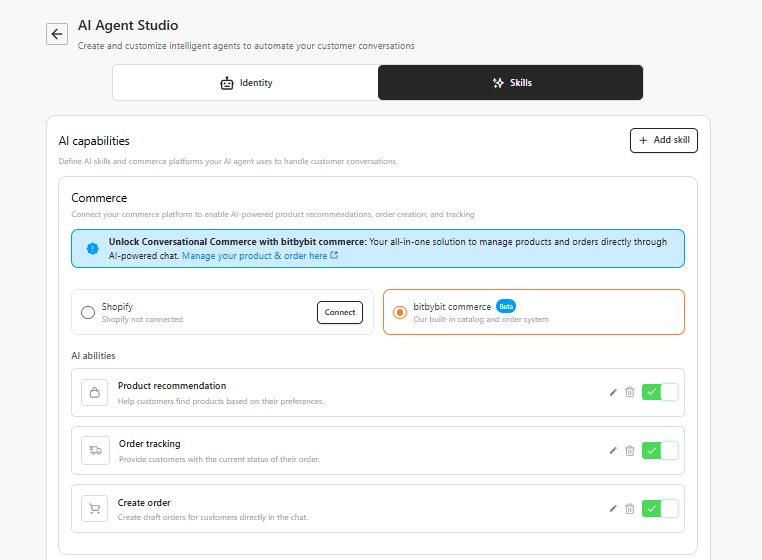
## **Step 3: Enable Relevant Skillsets**
To make your AI even more effective, ensure you have enabled the necessary skills in the **AI settings**:
* **Product Recommendations**: To help customers find the right items.
* **Order Tracking**: To answer post-purchase inquiries.
* **FAQs**: To handle common questions about shipping or payments.
 ## **Step 4: Save and Activate**
Click **Save changes** to apply your new persona and prompt settings.
## **Step 4: Save and Activate**
Click **Save changes** to apply your new persona and prompt settings.
 ## **Step 5: Your Job is Simplified!**
Congrats! You have optimized the AI to handle the heavy lifting of information gathering. Now, your task is only to:
* **Click Fulfill**: Update the shipment details once the order is ready.
* **Request Order/Pick Up**: Directly call a driver to deliver the order to the customer once payment is confirmed.
## **Step 5: Your Job is Simplified!**
Congrats! You have optimized the AI to handle the heavy lifting of information gathering. Now, your task is only to:
* **Click Fulfill**: Update the shipment details once the order is ready.
* **Request Order/Pick Up**: Directly call a driver to deliver the order to the customer once payment is confirmed.