> ## Documentation Index
> Fetch the complete documentation index at: https://knowledge.bitbybit.studio/llms.txt
> Use this file to discover all available pages before exploring further.
# Payment updates and fulfillment
> Update payment status, fulfill items, request pickup, and automate WhatsApp order notifications in bitbybit
Once an order is created, you can manage the payment status and delivery.
1. **Update Paid Orders**: Once your customer has already paid, you can update the paid order status in the dashboard.
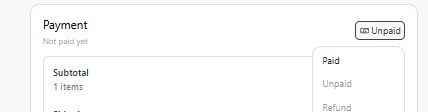 **Note**: If you are using **Xendit** or **Doku** integrated through bitbybit, you can skip this step as the payment status will **automatically update** once the customer completes the transaction
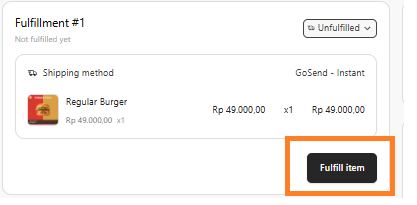
2. **Fulfill Item**: You can update the shipment details by clicking **Fulfill Item**.
**Note**: If you are using **Xendit** or **Doku** integrated through bitbybit, you can skip this step as the payment status will **automatically update** once the customer completes the transaction
2. **Fulfill Item**: You can update the shipment details by clicking **Fulfill Item**.
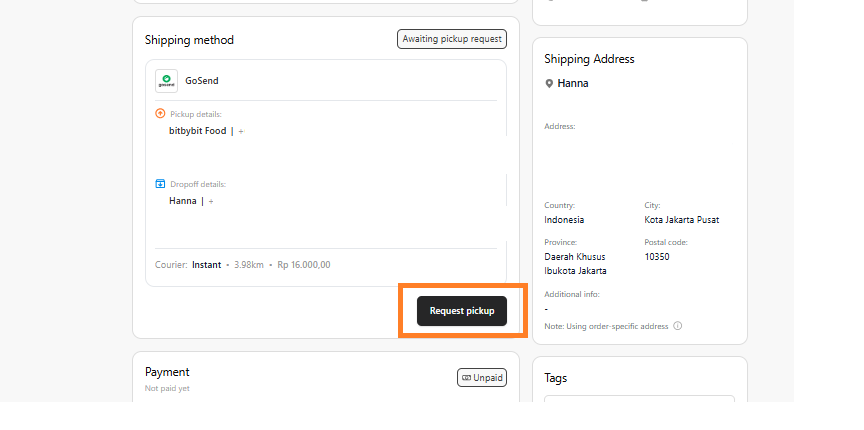
 3. **Request Pick Up**: Once the customer has already paid, you can request a pick-up; this will directly call a driver to pick up the order and deliver it to the customer.
 4. **Print Invoice**: After fulfillment, you can click **Print Invoice** to generate a copy for your records or the customer.
5. **Enable Order Notifications (Automation)**: You can activate **bitCRM Automations** to automatically notify customers about their order updates via WhatsApp. Common triggers include:
4. **Print Invoice**: After fulfillment, you can click **Print Invoice** to generate a copy for your records or the customer.
5. **Enable Order Notifications (Automation)**: You can activate **bitCRM Automations** to automatically notify customers about their order updates via WhatsApp. Common triggers include:
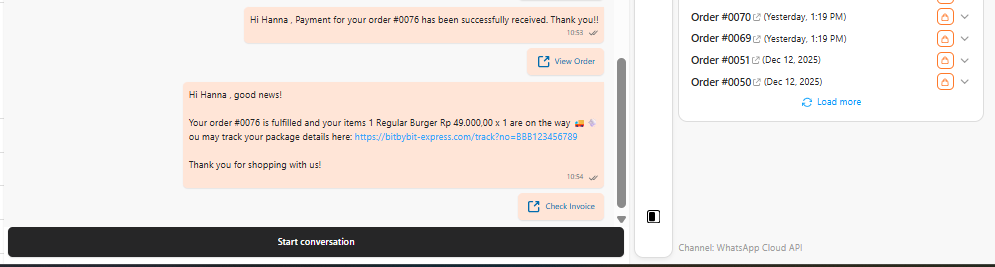 * **Click here** to see [how to activate the automation for WhatsApp Commerce](https://knowledge.bitbybit.studio/bitcrm/how-to-set-up-a-trigger).