If you need to locate your unique Company ID for support or integration purposes, follow these simple steps within your bitbybit dashboard.

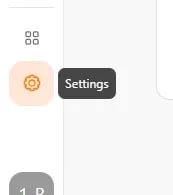
Step 1: Go to Settings

Log in to your bitbybit account. On the side panel menu, locate and click on the Settings icon. Image

Step 2: Access Company Settings

Once you are on the Settings page, look for the General section in the menu. Click on Company to open your company profile details. Image(6)

Step 3: Locate the ID

On the Company settings page, scroll down to the very bottom of the screen. You will find your specific Company ID displayed there. Image(7)