

What is AI Tagging? When your AI Agent handles a conversation, AI Tagging reads it and writes a short summary, a sentiment, an intention, a few keyword tags, and one value for each label you define. Use the results to review tickets faster, build customer segments, and read the AI analytics charts.
How it works
AI Tagging runs only on conversations handled by the AI Agent. Conversations answered only by human agents are not tagged. For each ticket the AI produces:- Summary — a short English summary, shown in the ticket detail panel as the AI-generated ticket summary.
- Sentiment —
positive,neutral, ornegative. - Intention — a short free-text description of what the customer wants.
orderis the special value for purchase intent. - AI tags — 3–5 lowercase keywords describing the conversation.
- Label values — one value for each label you configure on the AI Tagging page (see below).
AI Tagging does not consume AI credits. The number of labels you can create is capped per plan: Free 5, Starter 20, Growth 50, and Pro Bundle unlimited. See pricing for plan details.
Default labels
Every workspace starts with three labels. You can edit or delete any of them.The Intention chart in AI Agent analytics is built from the
intention label. If you delete the label, that chart has less data.Create a label
Create labels to track product interest, lead source, complaint type, or anything else you want to know about each conversation.1
Add a new label
- Navigate to AI Studio > AI Tagging.
- Click the Add new tag button in the top right corner.
2
Fill in the label
1. Label name
1. Label name
A short name, max 12 characters. This is the name you see in the ticket panel, filters, and analytics.
- Example:
Laptop
2. Label description
2. Label description
Tell the AI what the label means so it knows what to look for in the conversation. A specific description gives more consistent results.
- Example: “Which laptop model the customer asks about”
3. Tag options (optional)
3. Tag options (optional)
Turn this on and enter comma-separated options. The AI picks one of them for every ticket instead of creating its own values. If you leave it off, the AI writes a short free-text value instead.Tag options are not keywords the AI matches in the chat. The AI reads the whole conversation and chooses the option that fits best, even when the customer never types it word for word.
- Example:
MacBook Air, Dell XPS, Lenovo ThinkPad
5. Allow multiple values
5. Allow multiple values
Enable for tags that gather multiple entries over time, such as customer interests.
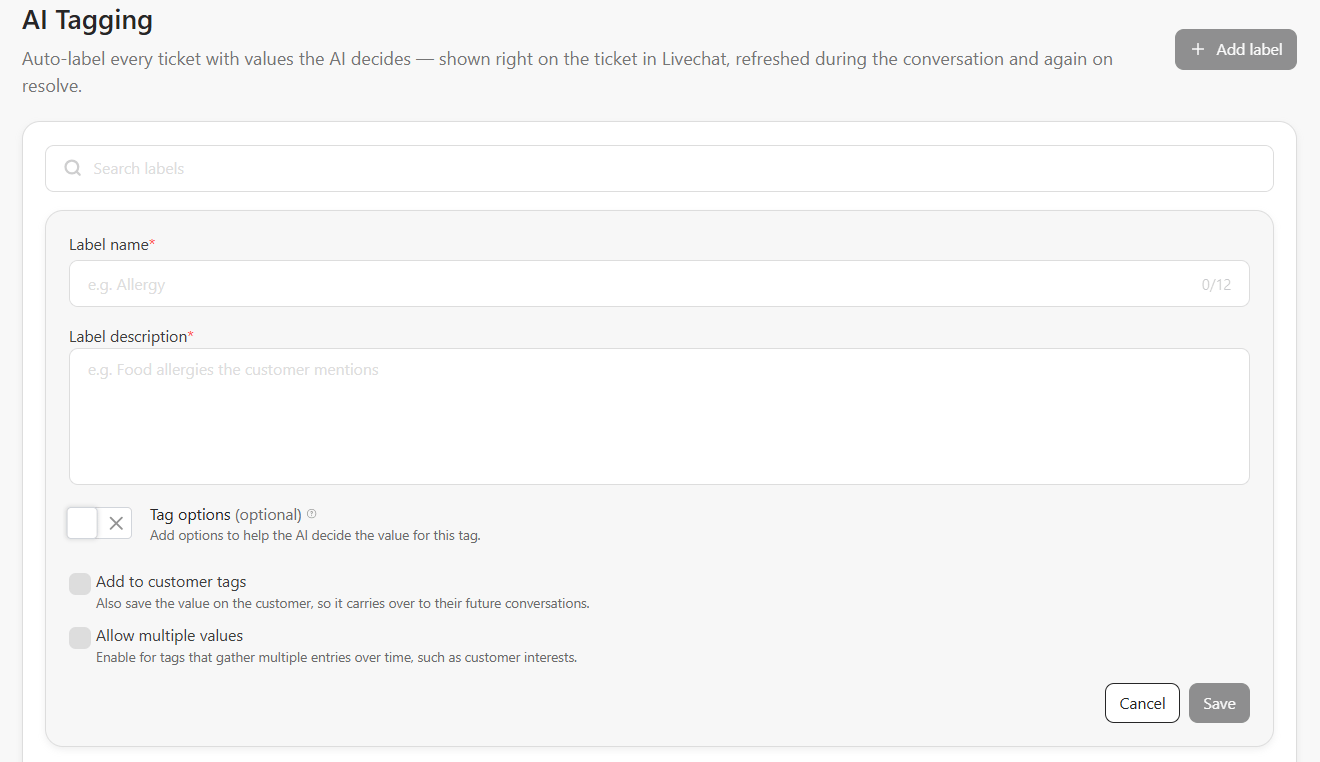
3
Save
Click Save. The AI includes the label the next time it tags a conversation.
Example labels
Where you see the results
- Ticket detail panel in the bitChat inbox — the AI summary, sentiment, and AI tags for the open ticket.
- The panel shows an AI tagging card. It shows the intention, sentiment, your label values, Topics, and Key details such as order number, tracking number, SKU, variant, and amount. Click a key detail to copy it, or click Copy summary to ticket notes to add the summary to the ticket notes.
- Customers list — the Ticket tags filter, and the Ticket tags condition in the segment builder. These work at the customer level and use the latest value of each label for that customer.
- bitChat analytics overview — the Top 5 AI tags card.
- AI Tags analytics page — AI tag trends across the period.
- AI Agent analytics — the Intention chart, built from the
intentionlabel.